
156-215.80 · Question #139
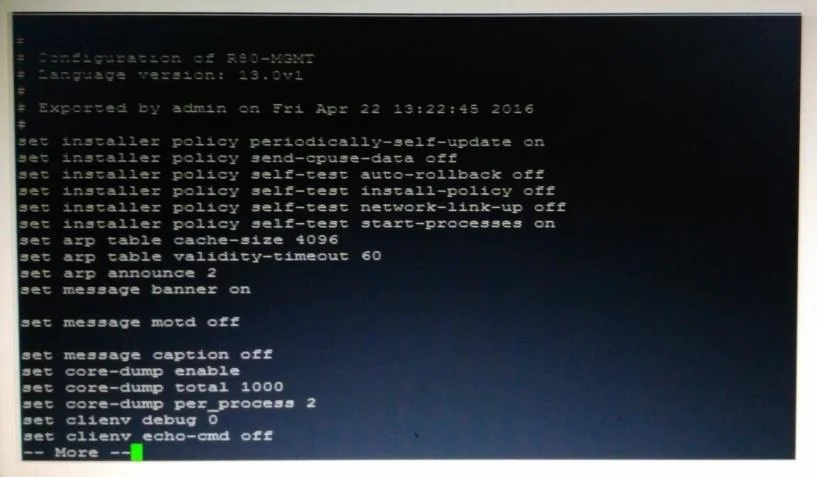
Look at the screenshot below. What CLISH command provides this output?
The correct answer is D. show configuration. The CLISH 'show configuration' command outputs the current Gaia OS configuration. No additional qualifiers like 'all' or 'confd' are needed for standard configuration display.
Question
Look at the screenshot below. What CLISH command provides this output?
Exhibit
Options
- Ashow configuration all
- Bshow confd configuration
- Cshow confd configuration all
- Dshow configuration
How the community answered
(27 responses)- B4% (1)
- C4% (1)
- D93% (25)
Why each option
The CLISH 'show configuration' command outputs the current Gaia OS configuration. No additional qualifiers like 'all' or 'confd' are needed for standard configuration display.
'show configuration all' is not valid CLISH syntax in Gaia OS - the 'all' qualifier is not a supported parameter for this command.
'show confd configuration' is not a valid CLISH command - 'confd' is an internal daemon not directly referenced in standard Gaia CLI commands.
'show confd configuration all' combines an invalid 'confd' reference with an unsupported 'all' parameter, making it an invalid CLISH command.
In Check Point Gaia CLISH, 'show configuration' is the correct command to display the current system configuration. It outputs the configuration in a structured, human-readable format representing all applied settings. The other options either use invalid syntax or reference 'confd' which is an internal configuration daemon not exposed directly in standard CLISH commands.
Concept tested: Check Point Gaia CLISH configuration display commands
Source: https://sc1.checkpoint.com/documents/R81/WebAdminGuides/EN/CP_R81_Gaia_AdminGuide/Content/Topics-GAG/CLISH.htm
Topics
Community Discussion
No community discussion yet for this question.