
156-215.76 · Question #78
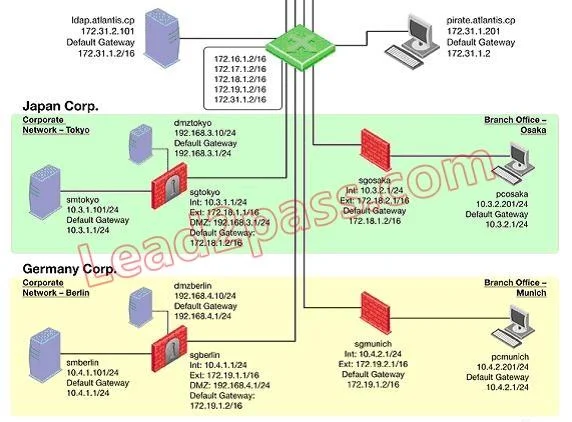
You want to reset SIC between smberlin and sgosaka. In SmartDashboard, you choose sgosaka, Communication, Reset. On sgosaka, you start cpconfig, choose Secure Internal Communication and enter the…
Sign in or unlock 156-215.76 to reveal the answer and full explanation for question #78. The question stem and answer options stay visible for context.
Question
You want to reset SIC between smberlin and sgosaka. In SmartDashboard, you choose sgosaka, Communication, Reset. On sgosaka, you start cpconfig, choose Secure Internal Communication and enter the new SIC Activation Key. The screen reads The SIC was successfully initialized and jumps back to the cpconfig menu. When trying to establish a connection, instead of a working connection, you receive this error message:
What is the reason for this behavior?
Exhibit
Options
- AThe Gateway was not rebooted, which is necessary to change the SIC key.
- BThe Check Point services on the Gateway were not restarted because you are still in the cpconfig utility.
- CYou must first initialize the Gateway object in SmartDashboard (i.e., right-click on the object, choose
- DThe activation key contains letters that are on different keys on localized keyboards.
Unlock 156-215.76 to see the answer
You've previewed enough free 156-215.76 questions. Unlock 156-215.76 for full answers, explanations, the timed quiz mode, progress tracking, and the master PDF. Question stem and options stay visible so you can still see what's on the exam.