
Check_Point
156-215.71 · Question #218
The allowed Sources in the Location tab of the User Properties window specify that the user to whom a User Authentication rule is being applied is not allowed access from the source address, while…
The correct answer is E. Configure User Authentication Action Properties screen. See the full explanation below for the reasoning.
Question
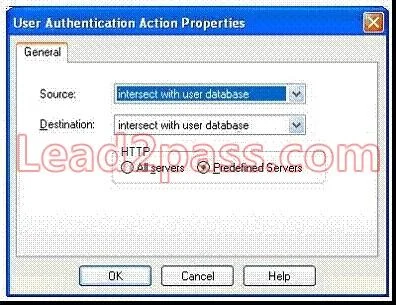
The allowed Sources in the Location tab of the User Properties window specify that the user to whom a User Authentication rule is being applied is not allowed access from the source address, while the rule itself allows access. To resolve this conflict, you will have to:
Check Point 156-215.71 Exam
Exhibit
Options
- ACreate an administrator account in place of the user account
- BInstall your rule base
- CRe-create the user object
- DSelect Allowed Destinations field in the Network Object Properties
- EConfigure User Authentication Action Properties screen
How the community answered
(37 responses)- B3% (1)
- C5% (2)
- D11% (4)
- E81% (30)
Community Discussion
No community discussion yet for this question.