
Check_Point
156-215.71 · Question #170
Your perimeter Security Gateway's external IP is 200.200.200.3. Your network diagram shows: Required: Allow only network 192.168.10.0 and 192.168.20.0 to go out to the Internet, using 200…
The correct answer is C. Create an address Range object, starting from 192.168.10.1 to 192.168.20.254. See the full explanation below for the reasoning.
Question
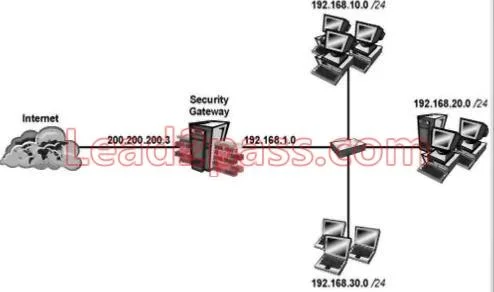
Your perimeter Security Gateway's external IP is 200.200.200.3. Your network diagram shows:
Required: Allow only network 192.168.10.0 and 192.168.20.0 to go out to the Internet, using 200. 200.200.5. The local network 192.168.1.0/24 needs to use 200.200.200.3 to go out to the Internet. Assuming you enable all the settings in the NAT page of Global Properties, how could you achieve these requirements? Check Point 156-215.71 Exam
Exhibit
Options
- ACreate a network object 192.168.0.0/16.
- BCreate network objects for 192.168.10.0/24 and 192.168.20.0/24.
- CCreate an address Range object, starting from 192.168.10.1 to 192.168.20.254.
- DCreate two network objects: 192.168.10.0/24. and 192.168.20.0/24.
How the community answered
(19 responses)- A5% (1)
- B11% (2)
- C79% (15)
- D5% (1)
Community Discussion
No community discussion yet for this question.