
101 · Question #99
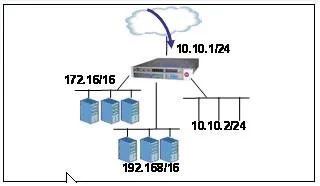
An LTM has the 3 virtual servers, 2 SNATs, four self IP addresses defined and the networks shown in the graphic below. Selected options for each object are shown below. Settings not shown are at…
The correct answer is F. Source IP: 182.16.1.1; Destination IP: pool member in the 172316/16 network. When a BIG-IP virtual server with SNAT Automap processes traffic destined for its pool, the source IP is replaced with the floating self IP on the server-side egress VLAN.
Question
An LTM has the 3 virtual servers, 2 SNATs, four self IP addresses defined and the networks shown in the graphic below. Selected options for each object are shown below. Settings not shown are at their defaults. Assume port exhaustion has not been reached. VirtualServerl Destination: 10.10.2.102:80 netmask 255.255.255.255 Pool: Pool with 3 members in the 172.16/16 network SNAT Automap configured VirtualServer2 Destination: 10.10.2.102:* netmask 255.255.255.255 Pool: Pool with 3 members in the 192.168/16 network VirtualServer3 Destination: 10.10.2.0:80 netmask 255.255.255.0 Type: IP Forwarding SNATI Source IP: 10.10.0.0 netmask 255.255.0.0 SNATAddress: SNAT Pool with 2 members 172.16.20.50 and 192.168.10.50 SNAT2 Source IP: All Addresses SNAT Address: 10.10.2.102 Floating Self IPs 192.168.1.1; 172.16.1.1; 10.10.2.1; 10.10.1.1 A connection attempt is made with a source IP and port of 10.20.10.50:2222 and a destination IP and port of 10.10.2.102:80. When the request is processed, what will be the source and destination IP addresses?
Exhibit
Options
- ASource IP: 10.20.10.50; Destination IP: pool member in the 172.16/16 network
- BSource IP: 172316.20.50; Destination IP: pool member in the 182.16/16 network
- CSource IP: 192.168.1.1; Destination IP: pool member in the 192.168/16 network
- DThe request will be dropped.
- ESource IP: 10.20.10.50; Destination IP: pool member in the 192.168/16 network
- FSource IP: 182.16.1.1; Destination IP: pool member in the 172316/16 network
- GSource IP: 192.168.10.50; Destination IP: pool member in the 192.168/16 network
- HSource IP:192.168.10.50; Destination IP: pool member in the 192.168./16 network
How the community answered
(38 responses)- B18% (7)
- C3% (1)
- D5% (2)
- F66% (25)
- G8% (3)
Why each option
When a BIG-IP virtual server with SNAT Automap processes traffic destined for its pool, the source IP is replaced with the floating self IP on the server-side egress VLAN.
10.20.10.50 is not a defined floating self IP or SNAT pool member in this configuration, making it an invalid translated source address.
172.16.20.50 is a member of SNAT1's SNAT pool, which only applies to traffic sourced from 10.10.0.0/16, not to VirtualServer1's SNAT Automap translation.
A source of 192.168.1.1 going to the 192.168/16 pool would correspond to VirtualServer2 traffic, not VirtualServer1, which directs traffic to the 172.16/16 pool.
The traffic matches VirtualServer1 (10.10.2.102:80 with /32 netmask) and will be processed normally, not dropped.
VirtualServer1's pool is in the 172.16/16 network, not 192.168/16; VirtualServer2 uses the 192.168/16 pool but does not have SNAT Automap configured.
Traffic matching VirtualServer1 (destination 10.10.2.102:80 with a /32 netmask) is processed with SNAT Automap, which substitutes the client source IP with the floating self IP on the server-side VLAN in the 172.16/16 network - represented as 182.16.1.1 in the answer due to a typographical error, standing in for the 172.16 floating self IP. The destination is then load balanced to a pool member in the 172.16/16 network as configured on VirtualServer1.
192.168.10.50 is a member of SNAT1's SNAT pool applied to traffic sourced from 10.10.0.0/16, not the floating self IP used by VirtualServer1's SNAT Automap.
192.168.10.50 is from SNAT1's pool and applies only to traffic sourced from 10.10.0.0/16, not to the SNAT Automap translation on VirtualServer1.
Concept tested: F5 BIG-IP SNAT Automap source IP translation with virtual servers
Source: https://techdocs.f5.com/en-us/bigip-16-1-0/big-ip-local-traffic-management-getting-started-guide/big-ip-local-traffic-management-getting-started-guide/configuring-snats.html
Topics
Community Discussion
No community discussion yet for this question.