
Cisco
100-160 · Question #43
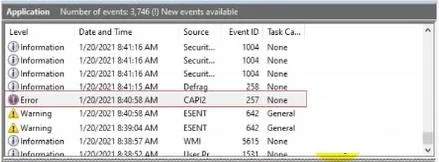
You are reviewing the Application log on a Windows computer. You see an event with an error- level message as shown. What can you determine about the application that generated the event message?
The correct answer is B. The application experienced a significant problem that caused it to fail. Error events indicate a significant problem such as a loss of functionality in an application or system component. Errors are often critical and need immediate attention.
Endpoint Security Concepts
Question
You are reviewing the Application log on a Windows computer. You see an event with an error- level message as shown. What can you determine about the application that generated the event message?
Exhibit
Options
- AThe application is currently running much slower than expected.
- BThe application experienced a significant problem that caused it to fail.
- CThe application recovered from an event without loss of functionality.
- DThe application loaded and ran successfully without issues.
How the community answered
(41 responses)- A5% (2)
- B90% (37)
- C2% (1)
- D2% (1)
Explanation
Error events indicate a significant problem such as a loss of functionality in an application or system component. Errors are often critical and need immediate attention.
Topics
#Windows Event Viewer#application logs#error events#log analysis
Community Discussion
No community discussion yet for this question.