
050-696 · Question #146
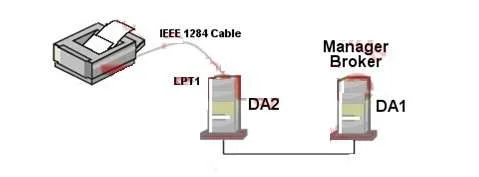
Click the Exhibit button to begin. You need to configure a special purpose thermal-transfer printer for your organization. Because it doesn't have a built-in network interface, you've connected it…
The correct answer is E. No, locally-connected printers must have the Manager loaded on the local server. Novell iPrint requires that the iPrint Manager be installed on the same server to which a printer is physically connected via a local port; a remote iPrint Manager on a different server cannot manage a locally attached device.
Question
Exhibit
Options
- AYes, all iPrint requirements have been met.
- BNo, iPrint isn't compatible with thermal printers.
- CNo, the Broker and the Manager can't reside on the same server.
- DNo, iPrint can't manage a printer connected to an LPT port on a server.
- ENo, locally-connected printers must have the Manager loaded on the local server.
How the community answered
(25 responses)- B8% (2)
- C8% (2)
- D4% (1)
- E80% (20)
Why each option
Novell iPrint requires that the iPrint Manager be installed on the same server to which a printer is physically connected via a local port; a remote iPrint Manager on a different server cannot manage a locally attached device.
The configuration does not meet all requirements because the iPrint Manager is on a different server than the one physically hosting the printer.
iPrint compatibility is not restricted by printer technology type; thermal-transfer printers are not excluded from iPrint support.
The Broker and the iPrint Manager are fully supported on the same server and commonly deployed that way.
iPrint can manage printers attached to LPT ports, but only when the Manager is running on the server where that LPT port resides.
When a printer is connected directly to a server's physical port such as LPT1, iPrint's architecture requires the iPrint Manager (NDPSM) to run locally on that same server because port-based communication and driver interaction happen at the OS level of the host machine. The scenario places the Manager on DA1 while the printer is physically attached to DA2, which violates this requirement. The Manager on DA1 must remain unaware of DA2's local port, so the configuration will not work as described.
Concept tested: Novell iPrint Manager locality requirement for port-attached printers
Source: https://www.novell.com/documentation/iprint/pdfdoc/iprint_admin/iprint_admin.pdf
Topics
Community Discussion
12 Grace U.Jun 24, 2026
The correct answer is E, and the reasoning clicks once you think about how iPrint handles locally attached printers. When a printer connects directly to a server's parallel port rather than the network, the iPrint Manager that hosts that printer's Printer Agent has to live on that same physical server, because the Manager is what communicates with the local port. Your printer is on DA2's LPT1, so the Manager needs to be on DA2, not DA1. Moving the Manager over, or loading a second Manager instance on DA2, would make this work fine, and then your existing Broker on DA1 can still support it without any issue.
 Fatima Z.Jun 24, 2026
Grace nailed it, and here is the hook that will burn it into your brain for exam day: just remember LPT stands for "Locked, Print, There" because whatever machine owns that port locks the Manager to that same spot, period.
 Ingrid P.Feb 8, 2026
E is the one you want. iPrint can manage locally-connected printers, but the iPrint Manager must be loaded on the same server where the printer is physically attached, so you cannot have DA1 manage a printer plugged into LPT1 on DA2.
 Yusuf A.Mar 21, 2026
So the Manager has to be local to the printer, right, but why exactly?
 Hiroshi T.Mar 23, 2026
The Manager must reside on a print server that has a local or network-visible connection to the printer because it communicates directly with the print device using protocols that require reachable network or port access, but to be precise, "local to the printer" overstates it slightly, since the Manager can sit on a remote print server as long as that server has a routable path to the device.
 Samuel O.Mar 10, 2026
Makes sense, but did DA2 need its own Manager because iPrint requires the Manager local to the print device?
 Orla P.Mar 12, 2026
Yes, exactly right, and it is worth adding that the local Manager requirement is really driven by iPrint needing a bidirectional queue channel to the device, not just a driver install path.
 Wesley A.Jun 26, 2026
Thought A was right until I remembered the Manager has to be local to the port.
Orla P.Mar 2, 2026Right, E is it - the iPrint Manager has to be local to the server hosting the physical printer.
Hiroshi T.Feb 23, 2026iPrint requires a network-connected printer, LPT1 ports are not supported.
Ingrid P.Feb 24, 2026Hiroshi, actually E is correct here, because iPrint does support LPT1 via its port-capture feature, which redirects local parallel port jobs through the iPrint client to the network printer. Worth making a card on that one, since the LPT1 exception trips up a lot of people who assume it is purely network-dependent.
Fatima Z.Jun 23, 2026I almost circled D because I had this voice in my head screaming "LPT ports are ancient relics," but iPrint actually has no beef with parallel-port printers, so that trap snapped shut on me fast. The real gotcha here is the LOCAL LEASH rule, and here is my hook for it: picture a dog on a leash tied to a post on DA2, that dog is the printer, and the only manager who can handle that dog is the one standing right next to that post, meaning the Manager must be loaded on DA2, not DA1. Think LLML to lock it in: Locally-connected printers need a Locally-loaded Manager to Live. The scenario has the Manager sitting cozy on DA1 while the printer is physically chained to DA2, so no matter how powerful that DA1 Manager is, it simply cannot reach across servers to own a locally-attached device, and E is the only answer that captures that.