
010-151 · Question #82
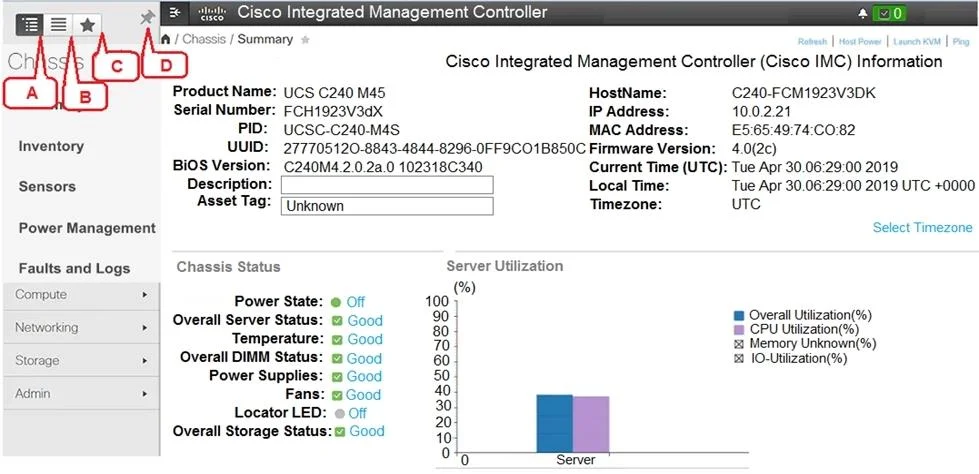
Refer to the exhibit. Which item does C represent?
The correct answer is C. Favorite Icon (make any specific work pane in the application as your favorite). In the Cisco UCS Manager GUI, the icon labeled C is the Favorites icon, which allows users to bookmark a specific work pane for quick access.
Question
Refer to the exhibit. Which item does C represent?
Exhibit
Options
- APin icon (prevents Navigation pane from sliding)
- BIcon to view the Navigation pane
- CFavorite Icon (make any specific work pane in the application as your favorite)
- DIndex Icon (view listing in alphabetical order)
How the community answered
(26 responses)- A4% (1)
- B12% (3)
- C81% (21)
- D4% (1)
Why each option
In the Cisco UCS Manager GUI, the icon labeled C is the Favorites icon, which allows users to bookmark a specific work pane for quick access.
The Pin icon is a separate control that locks the Navigation pane open so it does not auto-collapse, which is a different function from bookmarking a work pane.
The icon to view the Navigation pane is used to expand or reveal the left-side navigation panel, not to save or favorite a particular work pane.
The Favorites icon in UCSM lets a user designate any active work pane as a favorite, making it quickly accessible from a dedicated favorites list within the navigation interface.
The Index icon provides an alphabetical listing view within the navigation pane, which is a different organizational function unrelated to favoriting work panes.
Concept tested: UCS Manager GUI navigation pane icons
Source: https://www.cisco.com/c/en/us/td/docs/unified_computing/ucs/ucs-manager/GUI-User-Guides/Getting-Started/4-0/b_UCSM_GUI_Getting_Started_Guide_4_0.html
Topics
Community Discussion
No community discussion yet for this question.