
010-151 · Question #7
Refer to the exhibit. Which statement correctly identifies the front panel LEDs on the Cisco UCS C220 Server?
The correct answer is A. A is power button and power status LED. On the Cisco UCS C220 server front panel, the component labeled A is the combined power button and power status LED.
Question
Refer to the exhibit. Which statement correctly identifies the front panel LEDs on the Cisco UCS C220 Server?
Exhibit
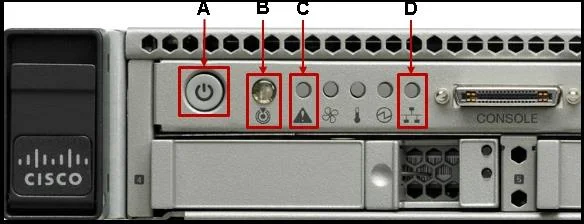
Options
- AA is power button and power status LED;
- BA is network link activity LED;
- CA is system status LED;
- DA is network link activity LED;
How the community answered
(40 responses)- A78% (31)
- B3% (1)
- C15% (6)
- D5% (2)
Why each option
On the Cisco UCS C220 server front panel, the component labeled A is the combined power button and power status LED.
On the Cisco UCS C220 front panel, position A is the power button, which integrates a power status LED that illuminates to indicate the server's current power state. This dual-function component allows both physical power control and visual status monitoring from a single front-panel element. Correctly identifying this component is fundamental to physical server management and first-response troubleshooting.
The network link activity LED is a separate indicator located at a different front panel position on the UCS C220 and is not the component at position A.
The system status LED is a distinct LED at a separate front panel location on the UCS C220 and does not occupy position A.
Position A on the UCS C220 front panel is not the network link activity LED; that indicator resides at a different labeled position on the panel.
Concept tested: Cisco UCS C220 front panel component identification
Source: https://www.cisco.com/c/en/us/td/docs/unified_computing/ucs/c/hw/C220/install/C220.html
Topics
Community Discussion
No community discussion yet for this question.