
000-221 · Question #115
An administrator was told to reverse the search order of a working DNS lookup. During application testing it was discovered that network resolution was not working for the end users. Given the…
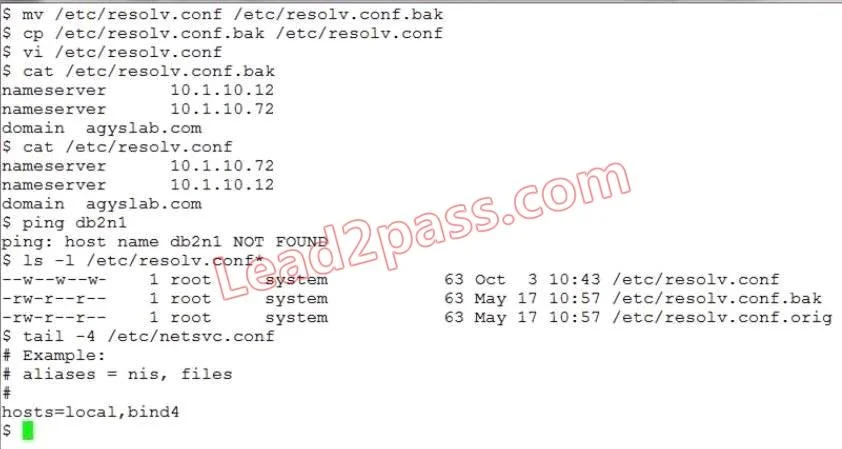
The correct answer is C. Incorrect file permissions on the/etc/resolv.conf file. After an administrator edits /etc/resolv.conf to reverse DNS search order, incorrect file permissions on the file will prevent non-root processes from reading DNS configuration, breaking name resolution for end users.
Question
An administrator was told to reverse the search order of a working DNS lookup. During application testing it was discovered that network resolution was not working for the end users. Given the following output, what is the most likely cause?
Exhibit
Options
- AThe first DNS server is unreachable.
- BThe netsvc.conf has the incorrect host lookup order.
- CIncorrect file permissions on the/etc/resolv.conf file.
- DThe host is not on the network.
How the community answered
(14 responses)- B14% (2)
- C79% (11)
- D7% (1)
Why each option
After an administrator edits /etc/resolv.conf to reverse DNS search order, incorrect file permissions on the file will prevent non-root processes from reading DNS configuration, breaking name resolution for end users.
An unreachable first DNS server would cause slow lookups or automatic failover to a secondary server, not a total resolution failure for all end users.
The netsvc.conf search order was intentionally reversed per the administrator's instructions, and a correctly reversed entry would still allow resolution to function - the failure points to file accessibility, not search order logic.
The /etc/resolv.conf file must be world-readable for DNS resolution to work for all users; if an administrator modifies the file and inadvertently sets restrictive permissions (such as readable only by root), non-root processes and end-user applications cannot read the DNS server configuration, causing complete resolution failure even when the file content is technically correct.
If the host were not on the network, all network-dependent services would be unavailable, not just DNS resolution, making this an overly broad and unlikely cause.
Concept tested: AIX /etc/resolv.conf file permissions affecting DNS resolution
Source: https://www.ibm.com/docs/en/aix/7.3?topic=resolution-etcresolvconf-file
Topics
Community Discussion
No community discussion yet for this question.